

Artwork Requirements for Printing: The Complete Guide to Supplying Your Logo or Design
If you are ordering branded merchandise, clothing, promotional products, signage or customised items from us, the quality of the artwork you supply has a direct effect on the quality of the finished product.
One of the most common problems we encounter is receiving a logo as a small JPG, a screenshot, an image downloaded from Facebook, a low-resolution PNG or another file that may look perfectly acceptable on a phone or computer screen but is not suitable for professional printing.
An image looking clear on your screen does not necessarily mean it is suitable for printing.
Different decoration methods also have different artwork requirements. A transparent high-resolution PNG may be perfectly usable for DTF printing, for example, while the same file may not be suitable for screen printing, pad printing, laser engraving or certain other production methods.
This guide explains exactly what artwork we need, why we need it, how you can check your files and what to do if you do not have the correct artwork available.
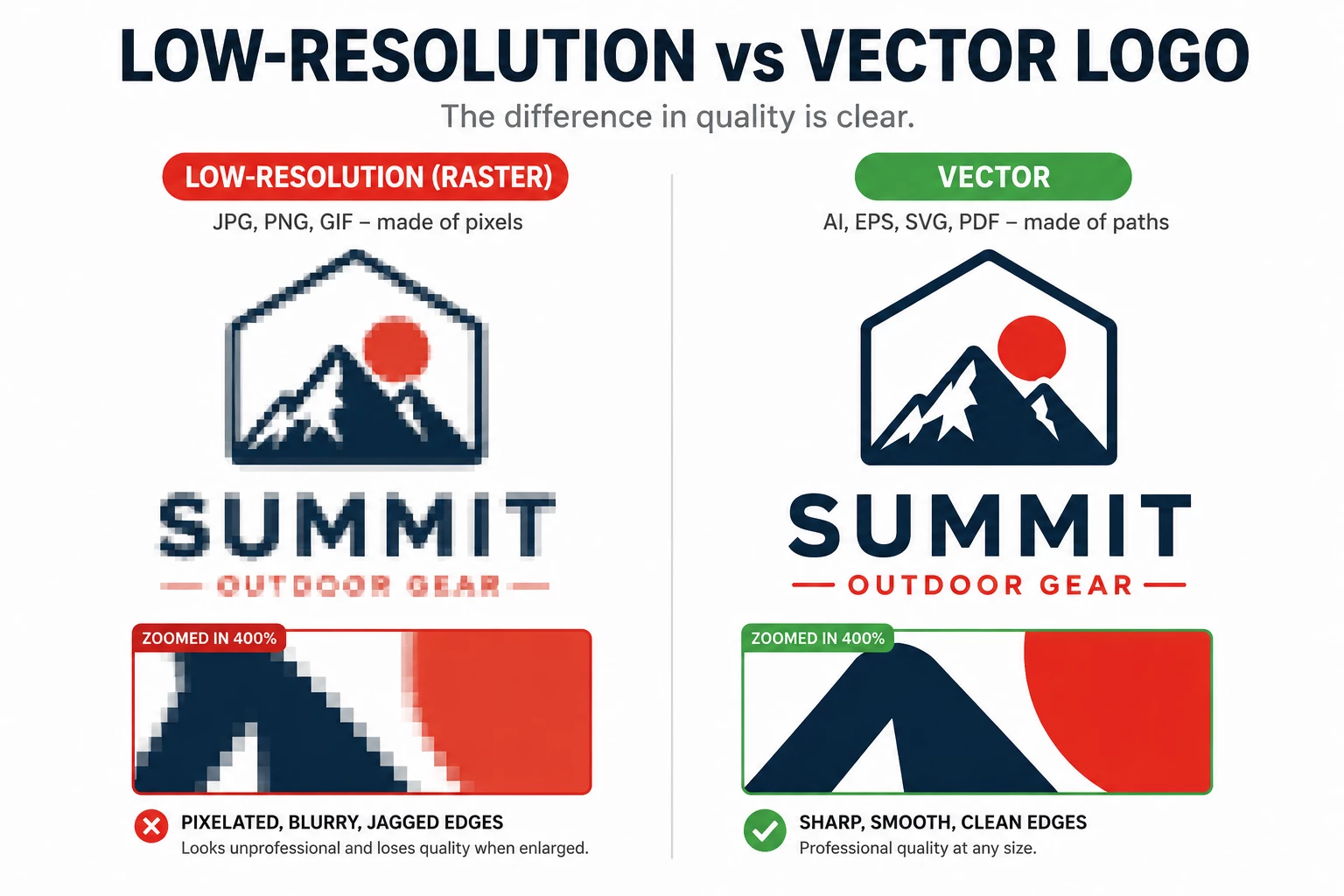
Table of Contents
- Quick Answer: What File Should I Send?
- What Is Vector Artwork?
- What Is Raster Artwork?
- A PNG Is Not Automatically Print Ready
- What Does “Transparent Background” Mean?
- What Is Resolution?
- Why We Cannot Simply “Make the JPG Bigger”
- Renaming or Converting the File Does Not Make It Vector
- Not Every PDF Is Vector Artwork
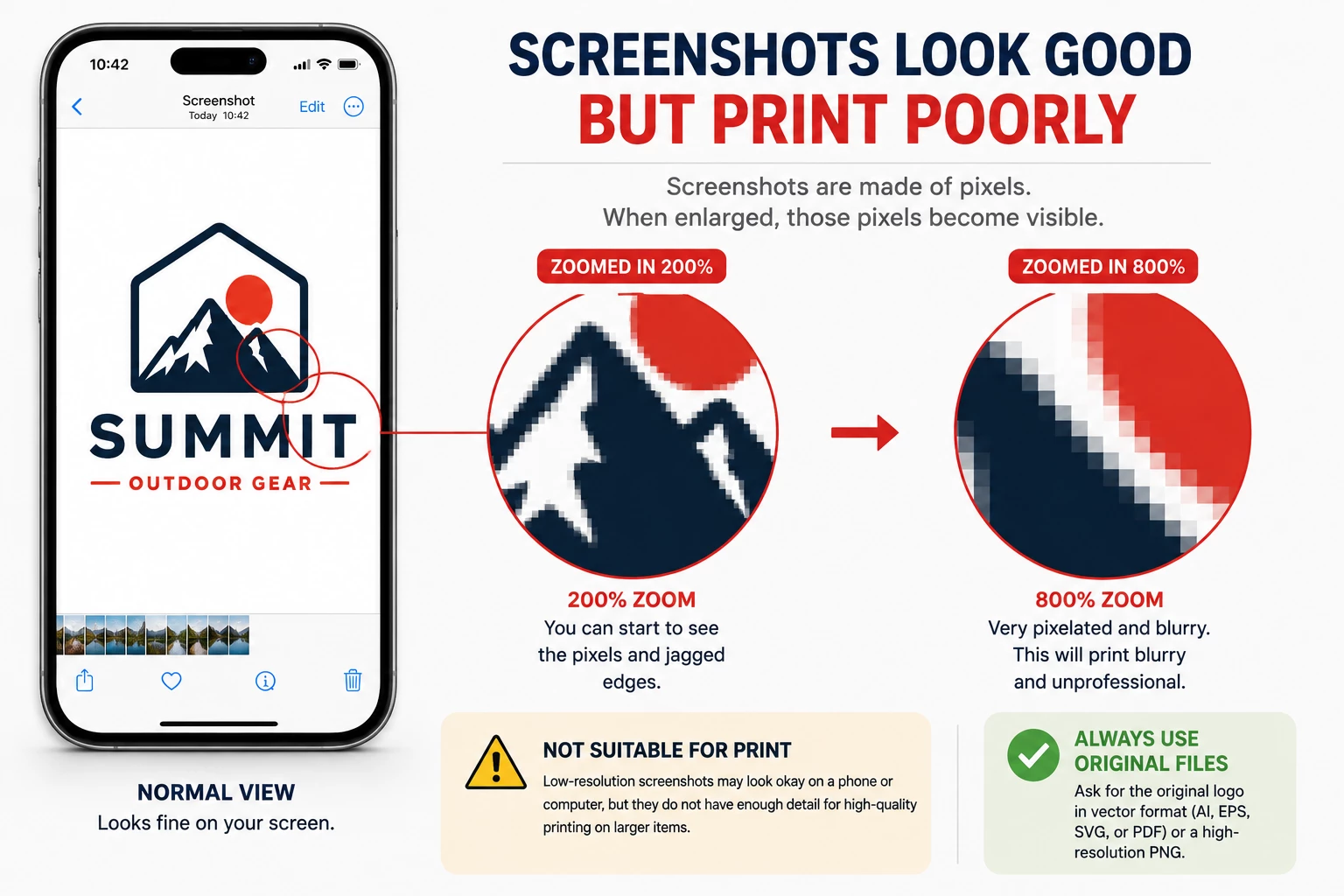
- Why Screenshots Are Usually Unsuitable
- Do Not Send Logos Through WhatsApp If the Original File Is Available
- Images Downloaded From Websites Are Often Too Small
- Which Artwork Is Required for DTF Printing?
- Which Artwork Is Required for Embroidery?
- Which Artwork Is Required for Screen Printing?
- Which Artwork Is Required for Pad Printing?
- Which Artwork Is Required for Laser Engraving?
- Which Artwork Is Required for UV Printing?
- Which Artwork Is Required for Sublimation?
- What About Large-Format Printing, Banners and Signs?
- JPG vs PNG vs SVG vs PDF vs AI vs EPS
- What If My Artwork Was Made in Canva?
- What If My Artwork Is in Microsoft Word or PowerPoint?
- Fonts and Text in Artwork
- Very Small Text Can Still Be a Problem
- Thin Lines and Tiny Details
- Gradients, Shadows and Transparency Effects
- Ideally Your Company Should Have These Logo Versions
- RGB, CMYK and Pantone Colours
- Why Can My Brand Colour Look Different on Different Products?
- Photographs Are Different From Logos
- QR Codes and Barcodes Require Special Attention
- Please Do Not Crop Important Parts of Your Logo
- Do Not Flatten Important Artwork Unless Necessary
- Can You Remove the Background From My Logo?
- Can You Convert My JPG Into Vector Artwork?
- Why Artwork Recreation May Carry a Charge
- “My Previous Printer Used This JPG, So Why Can’t You?”
- “But It Looks Perfect on My Phone”
- “Can I Just Send the Logo From My Email Signature?”
- “Can I Send You a Photo of My Existing Uniform?”
- What If I Have No Artwork at All?
- What Should I Ask My Graphic Designer For?
- What Should I Send If I Am Not Sure?
- Artwork Checklist Before Sending Your Order
- Best Artwork by Decoration Method: Quick Reference
- The Most Important Rule: Send the Original Artwork
- Why We Check Artwork Before Production
- Sending Artwork to Custom Island Gifts
Quick Answer: What File Should I Send?
If you have the original design files for your logo, please send them.
For logos, illustrations and text-based artwork, our preferred formats are:
- AI – Adobe Illustrator
- EPS – Encapsulated PostScript
- SVG – Scalable Vector Graphics
- Vector PDF – provided the artwork inside the PDF is actually vector
Depending on the printing method, we may also be able to use:
- High-resolution transparent PNG
- High-resolution TIFF
- High-resolution PSD
- High-resolution JPG for photographs and certain full-colour applications
If you have several versions and you are unsure which one is correct, send us all of them. It is much easier for us to identify the best file than to try to recreate missing information from a poor-quality image.
What Is Vector Artwork?
Vector artwork is created using mathematical paths rather than individual pixels.
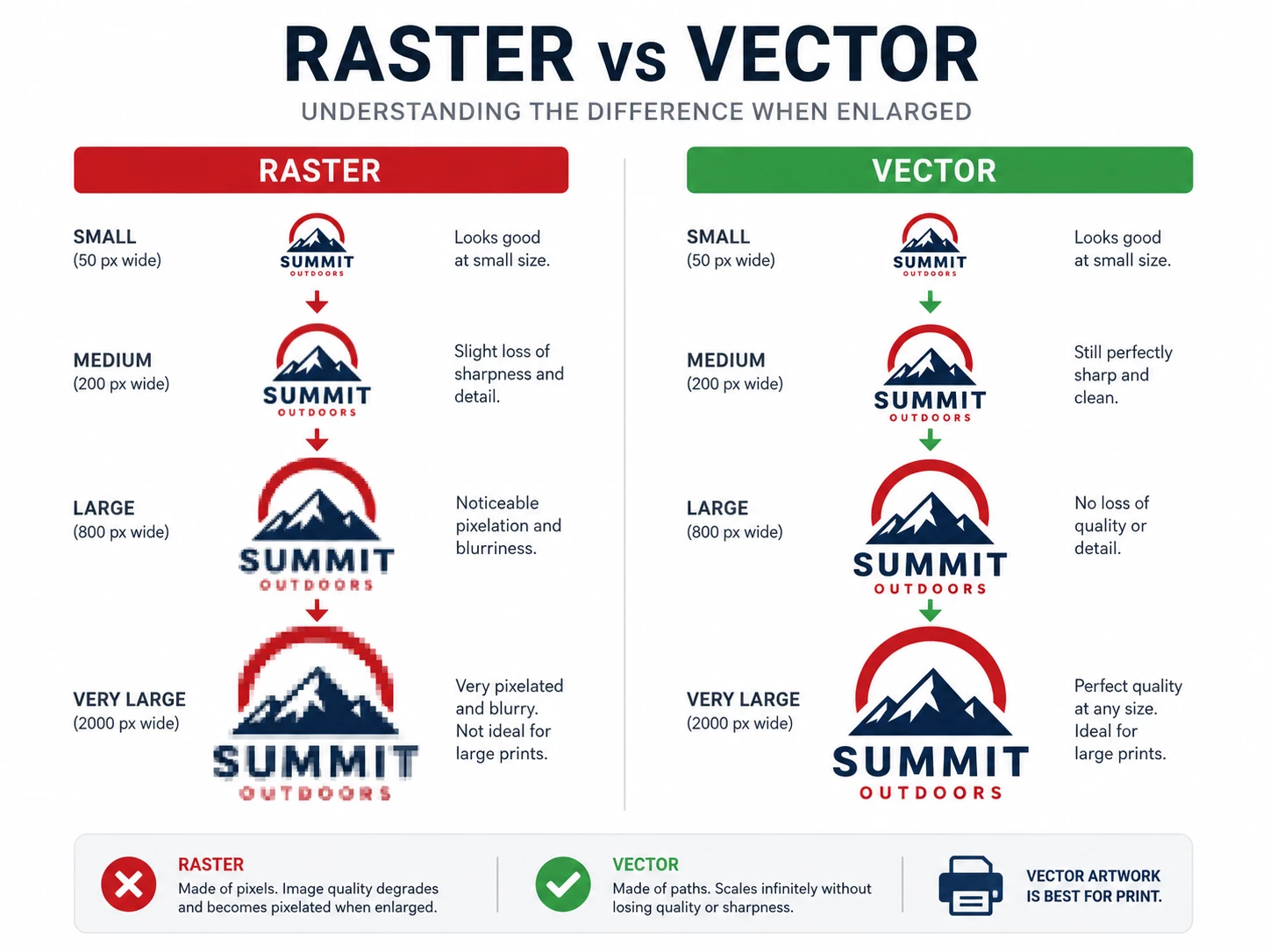
This means the artwork can normally be enlarged from a small business-card-sized logo to a large sign without becoming blurry or pixelated.
Vector artwork is generally the preferred format for logos because it gives us clean edges, accurate shapes and much greater flexibility when preparing artwork for different printing processes.
Typical vector file formats include:
- .AI
- .EPS
- .SVG
- some .PDF files
With proper vector artwork, we can usually separate colours, resize artwork, adjust print positions and prepare the design for different production methods without losing image quality.
Why does vector artwork matter?
Imagine your logo contains a curved letter.
In a vector file, that curve is defined mathematically. It therefore remains smooth regardless of how large it becomes.
In a raster image, the same curve is made from a fixed number of square pixels. As the image is enlarged, those pixels become increasingly visible.
This is why a logo copied from a website may look good at 300 pixels wide but look terrible when printed 25 cm wide across a T-shirt.
What Is Raster Artwork?
Raster images are made from pixels.
Common raster formats include:
- .JPG / .JPEG
- .PNG
- .BMP
- .GIF
- .TIFF
- some .PSD files
Raster files are not automatically bad.
High-resolution raster artwork is essential for photographs and can also work extremely well for certain full-colour printing processes.
The problem is that raster artwork has a fixed resolution.
If the artwork does not contain enough pixels for the required print size, increasing its physical size also increases the size of the individual pixels. This results in soft edges, jagged lines, fuzzy text and visible pixelation.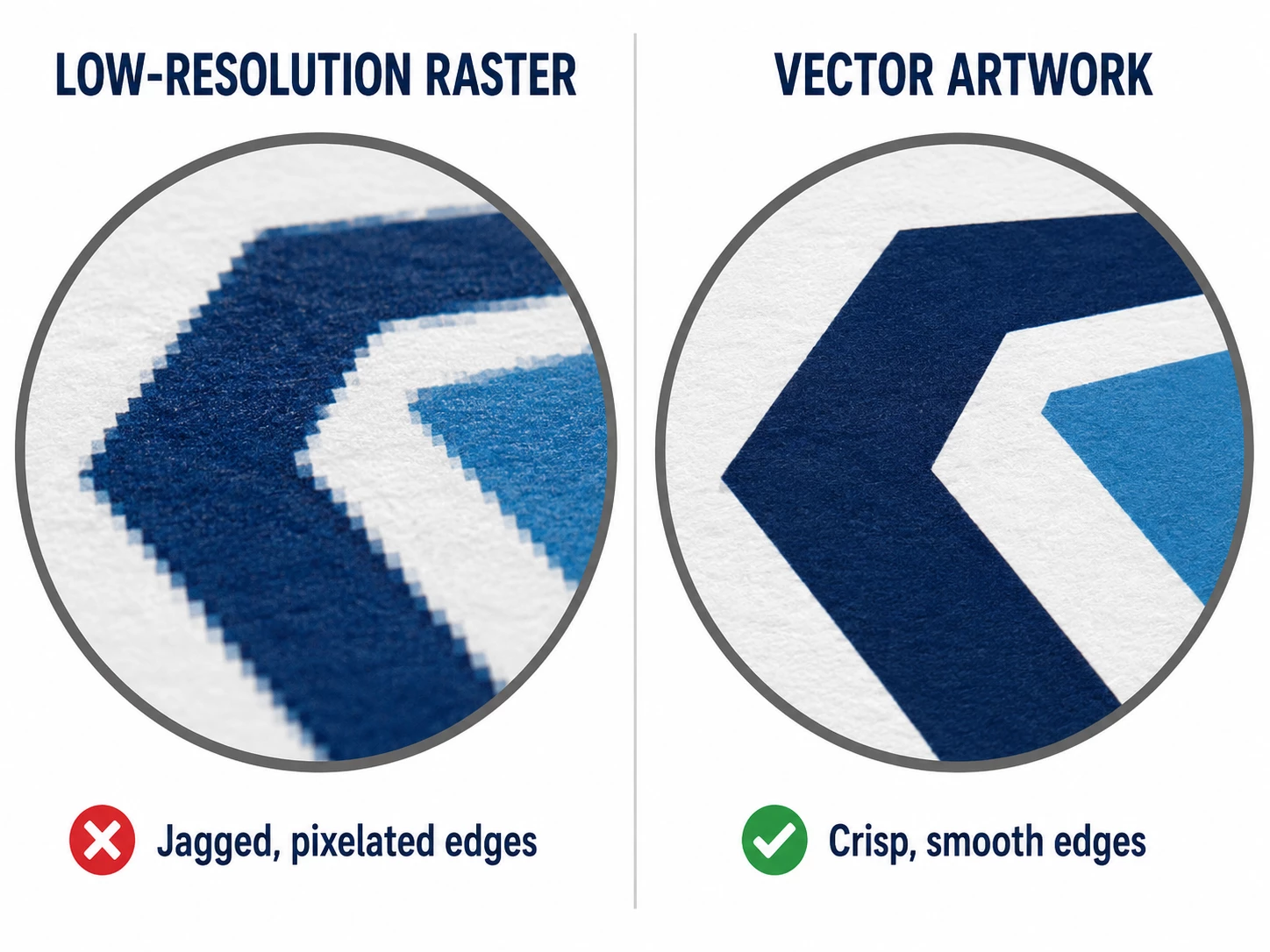
A PNG Is Not Automatically Print Ready
This is one of the most important points in this guide.
We regularly receive files described as:
“It is a PNG, so it should be good quality.”
Unfortunately, the file extension does not tell us how much usable image information is inside the file.
A PNG can be:
- 200 × 200 pixels and unusably small
- 4,000 × 4,000 pixels and excellent quality
- transparent
- placed on a white background
- perfectly sharp
- already badly pixelated before it was saved
The same applies to JPG files.
Changing a JPG into a PNG does not improve its quality.
If a low-quality JPG is opened and saved as PNG, it remains a low-quality image.
What Does “Transparent Background” Mean?
A transparent background means that there is no white, black or coloured rectangular background surrounding the logo.
This is particularly important for methods such as DTF printing where the design itself may be printed directly onto coloured clothing.
For example, if you send us a logo displayed on a white rectangle and we print that entire image onto a black T-shirt, the white rectangular area may also become part of the printed design.
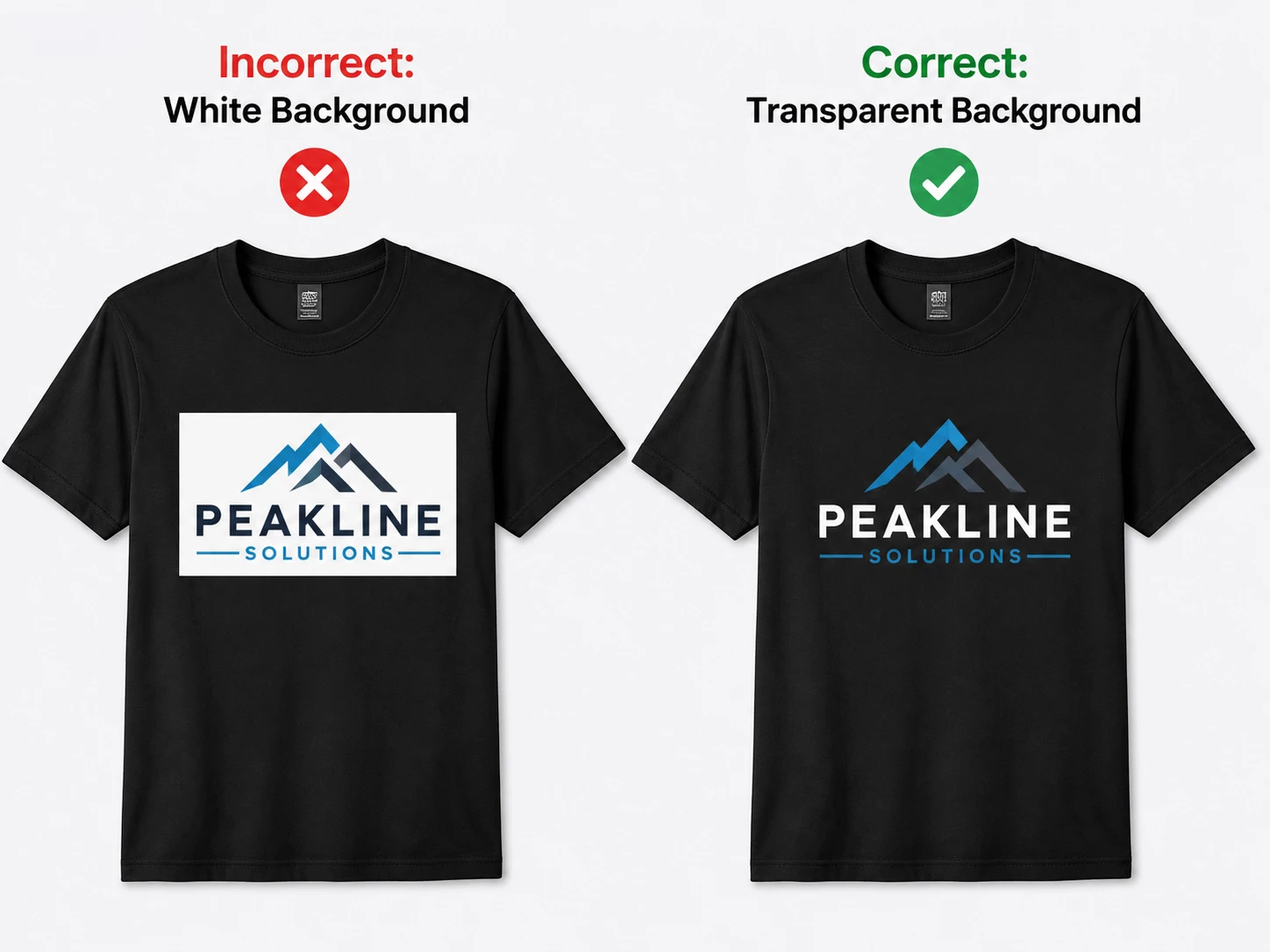
A proper transparent PNG should contain only the elements that are intended to be printed.
However, transparency alone does not make an image suitable.
A transparent 300 × 300 pixel PNG is still only 300 × 300 pixels.
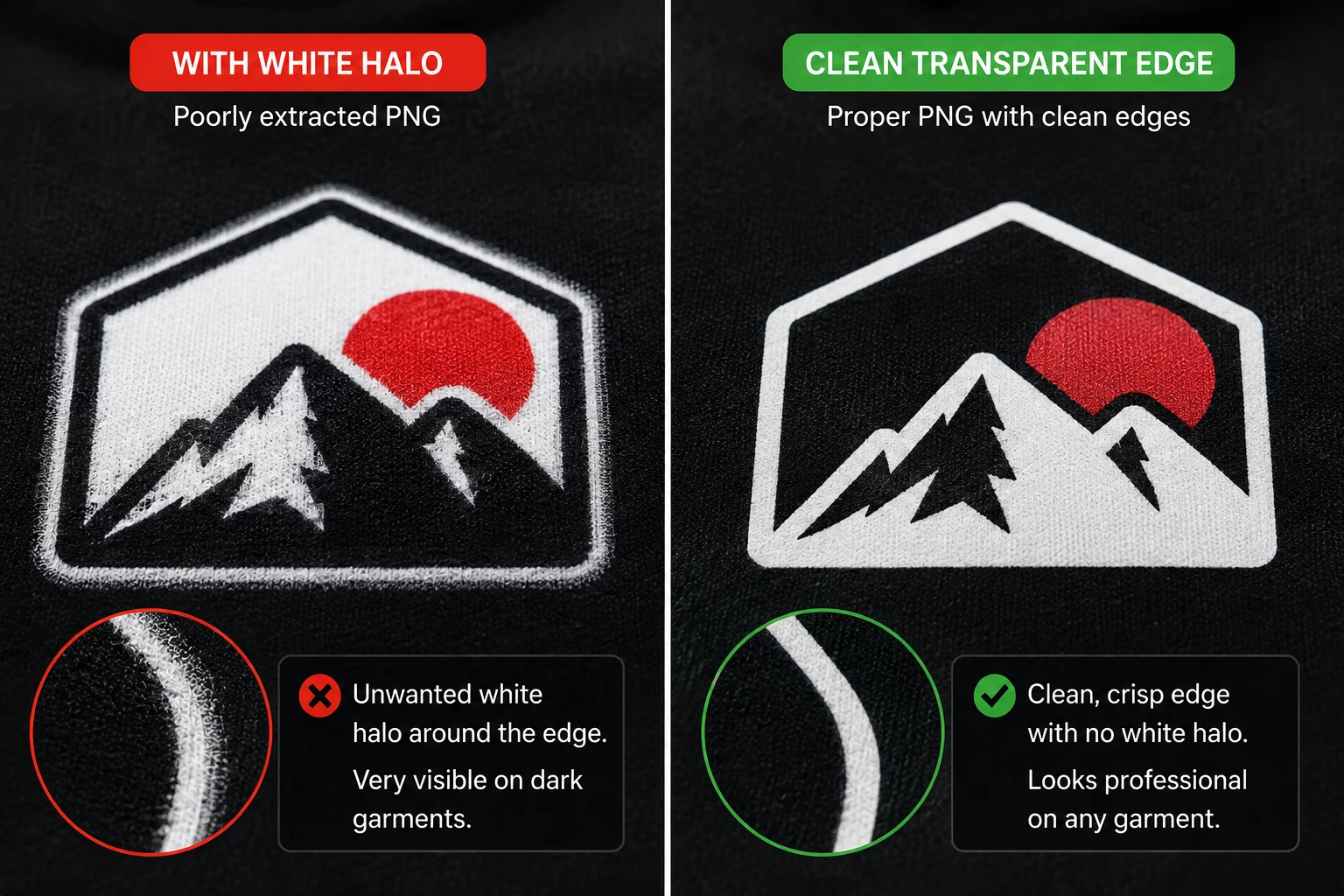
Watch out for white edges and halos
Another common issue occurs when a logo was originally extracted from a white background.
Even after the obvious white background is removed, small semi-transparent white pixels can remain around the edges.
These may be almost invisible on a white computer screen but can appear as a white halo when the design is printed onto dark fabric.
What Is Resolution?
Resolution refers to the amount of detail contained in a raster image.
For digital artwork, one of the most useful measurements is the image’s actual pixel dimensions.
For example:
- 300 × 300 pixels
- 1,000 × 1,000 pixels
- 3,000 × 3,000 pixels
- 5,000 × 5,000 pixels
The larger the intended print size, the more pixels are normally required.
What does 300 DPI mean?
DPI is commonly used when discussing print resolution. For artwork preparation, you may also see PPI, meaning pixels per inch.
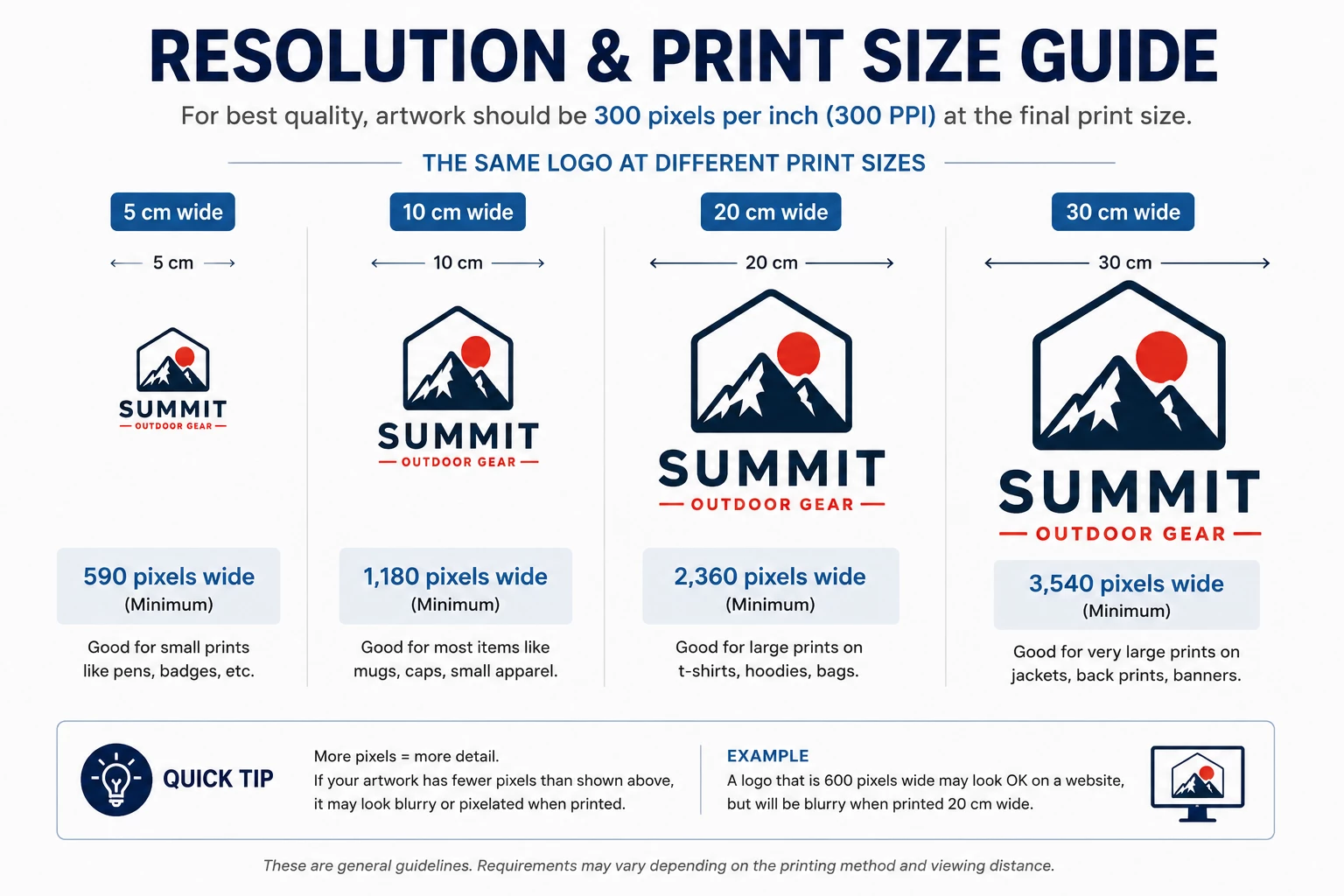
As a general rule, raster artwork intended for high-quality printing should ideally contain approximately 300 pixels per inch at the final printing size.
That final part is extremely important.
A file being labelled “300 DPI” does not automatically mean that it is suitable for every size.
A tiny image can technically contain a 300 DPI setting while still having nowhere near enough pixels to print a large design.
Approximate examples at 300 pixels per inch
| Approximate Print Size | Recommended Pixel Width |
|---|---|
| 5 cm wide | Approx. 590 pixels |
| 10 cm wide | Approx. 1,180 pixels |
| 20 cm wide | Approx. 2,360 pixels |
| 30 cm wide | Approx. 3,540 pixels |
| A4 page | Approx. 2480 × 3508 pixels |
These numbers are guidelines rather than universal production rules because requirements vary according to the printing process, viewing distance, product and artwork.
Why We Cannot Simply “Make the JPG Bigger”
If an image is too small, enlarging it does not magically recreate the original detail.
Software can create additional pixels between the existing pixels, and modern AI upscaling tools can sometimes improve certain images, but they cannot reliably recover every missing line, letter, curve or exact brand detail from severely degraded artwork.
This is especially important for company logos.
If a low-quality image contains:
- small text
- thin lines
- specific curves
- registered marks
- complex icons
- precise spacing
automatic enhancement or tracing may change the design.
For this reason, the correct original artwork is always preferable.
Renaming or Converting the File Does Not Make It Vector
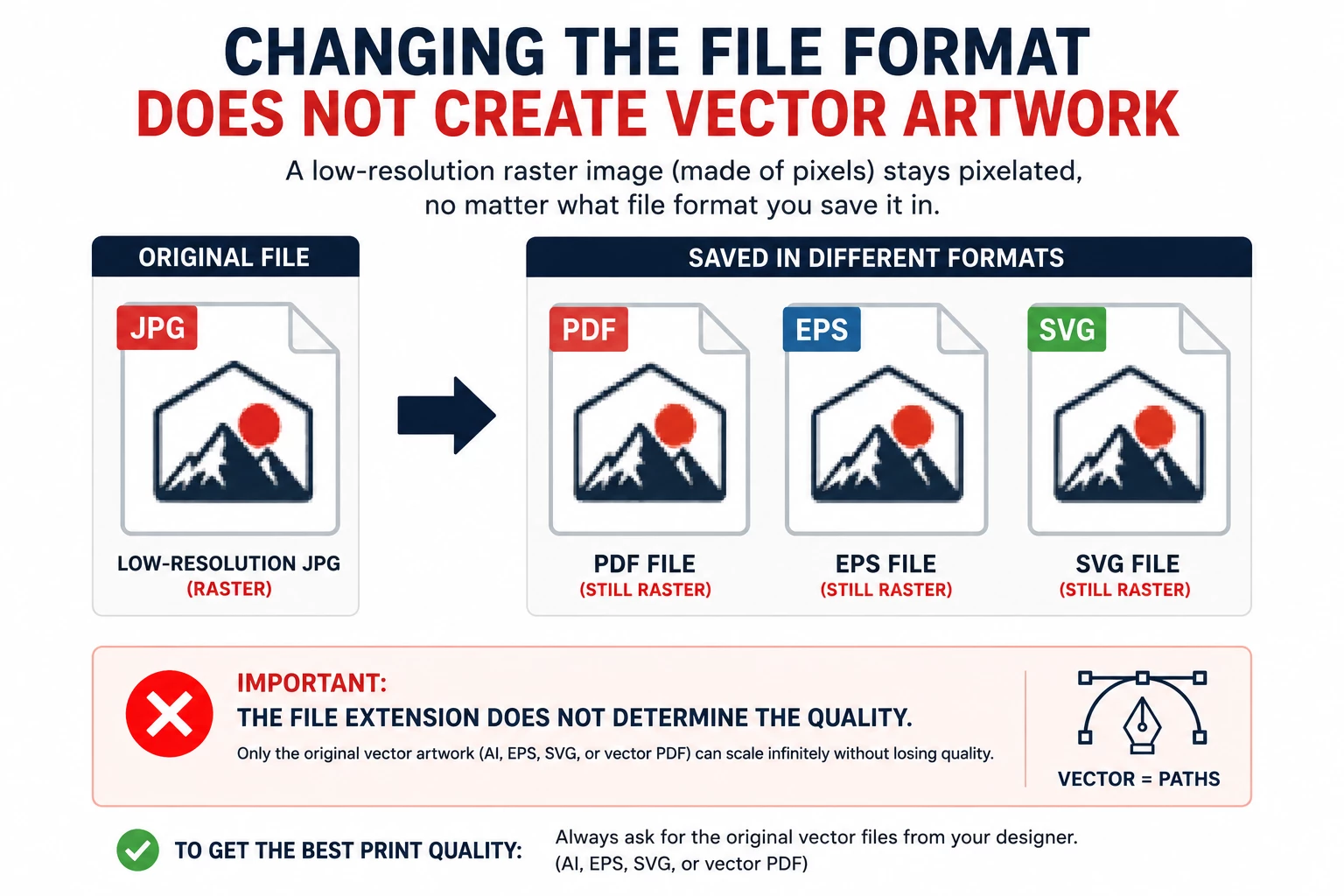
Another common misunderstanding is that converting a JPG into PDF, EPS or SVG automatically turns it into proper vector artwork.
It does not.
A raster JPG can simply be embedded inside an EPS, SVG or PDF file.
The container may have a vector-compatible extension, but the image inside it is still raster.
For example:
logo.jpg → save as PDF → still raster
logo.jpg → place in Illustrator → save as EPS → still raster
logo.jpg → rename to logo.svg → does not make it vector
Not Every PDF Is Vector Artwork
PDF is one of the most confusing artwork formats because a PDF can contain several different types of content.
A PDF might contain:
- true vector artwork
- high-resolution photographs
- low-resolution photographs
- a screenshot
- a JPG embedded inside the PDF
- text that has not been converted to outlines
- a mixture of raster and vector elements
Therefore, simply sending us a PDF does not guarantee that the artwork is suitable.
If your graphic designer created the logo professionally in Adobe Illustrator or another vector design program, ask them for the original vector artwork.
Why Screenshots Are Usually Unsuitable
A screenshot records only the pixels being displayed on your screen at that moment.
It does not contain the original vector information.
Examples of unsuitable artwork frequently include:
- a screenshot of your website header
- a screenshot from Facebook
- a screenshot from Instagram
- a screenshot of a PDF
- a screenshot of your email signature
- a screenshot from Google Images
- a photograph of a previous printed product
If you can see your logo somewhere online, there is usually a much better chance that the original file exists somewhere within your organisation.
Do Not Send Logos Through WhatsApp If the Original File Is Available
Messaging applications and social-media platforms may compress images to reduce file size.
This can remove image information and introduce compression artefacts.
If possible, send original artwork files directly by email, file transfer or another method that preserves the original file.
If you must use a messaging application, sending the artwork as a document/file instead of as a normal compressed image may help preserve the original file.
Images Downloaded From Websites Are Often Too Small
The logo displayed on a website is normally optimised for screen use.
Websites benefit from smaller files because they load faster, so the online version of a logo may be considerably smaller than the original artwork.
A website logo might only be 300–600 pixels wide because that is all that is required for the website layout.
That does not mean it is suitable for printing onto:
- T-shirts
- hoodies
- banners
- large bags
- signage
- table covers
- large promotional displays
Please send the original artwork whenever possible rather than downloading the logo from your own website.
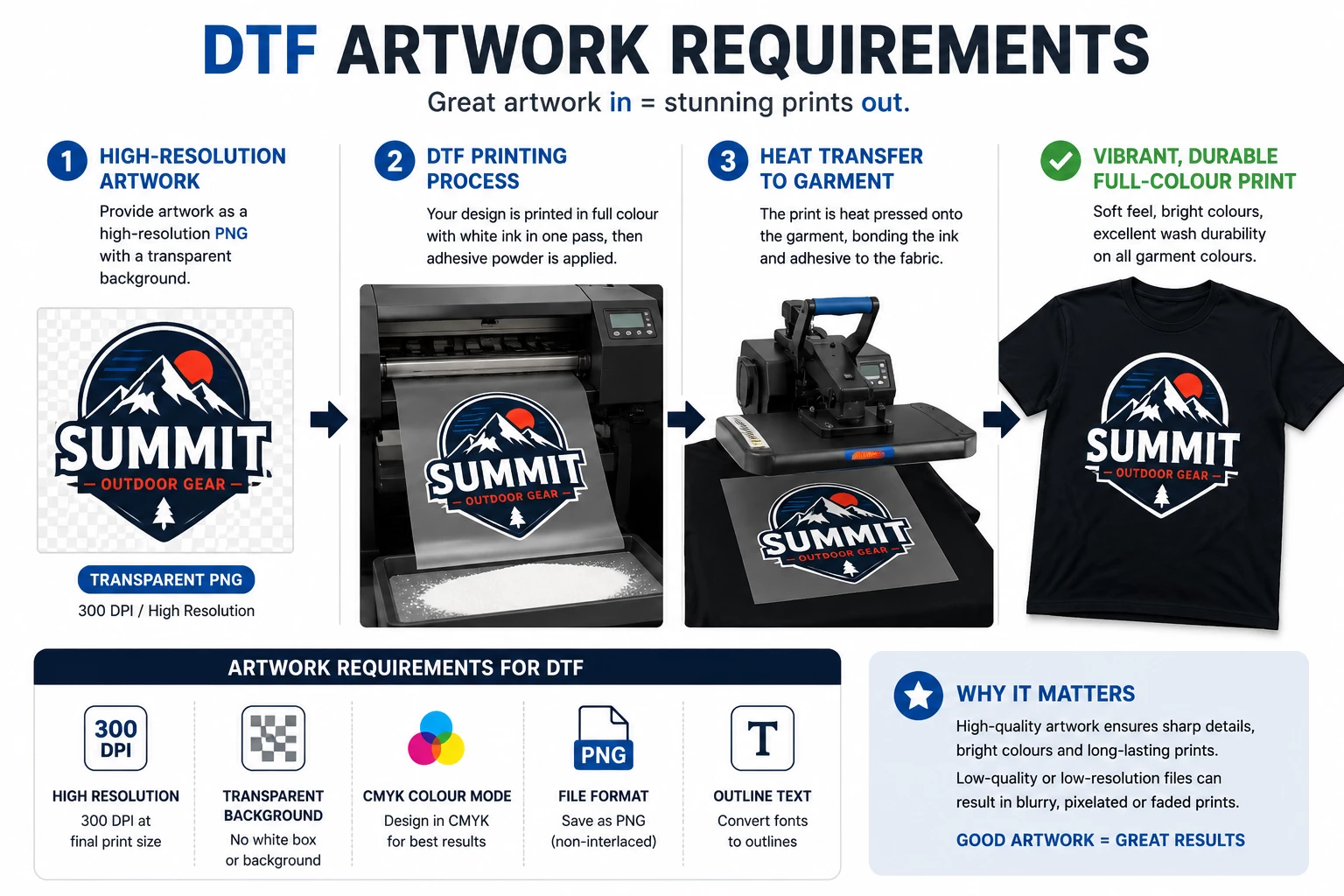
Which Artwork Is Required for DTF Printing?
DTF, or Direct-to-Film printing, is a full-colour garment-decoration process that can reproduce detailed artwork, gradients and photographic elements.
A good-quality raster image can therefore often be used successfully.
For DTF we generally require:
- high-resolution artwork
- sufficient pixel dimensions for the intended print size
- a clean transparent background where no background is intended
- clean edges
- no unwanted white pixels or halos
- good-quality text and logo elements
A transparent PNG can therefore be perfectly suitable for DTF.
However:
A transparent PNG is not automatically suitable simply because it is transparent.
If the logo is 400 pixels wide and is required to print 25 cm across a garment, it may still be too low resolution.
Very small details in DTF artwork
Even high-resolution artwork may contain elements that are simply too small to reproduce reliably.
Examples include:
- extremely thin lines
- tiny isolated dots
- very small text
- fine distressed effects
- tiny transparent gaps
Artwork may occasionally need to be adjusted to make it production suitable.
Which Artwork Is Required for Embroidery?
Embroidery works completely differently from printing.
An embroidery machine does not simply print the pixels in your logo.
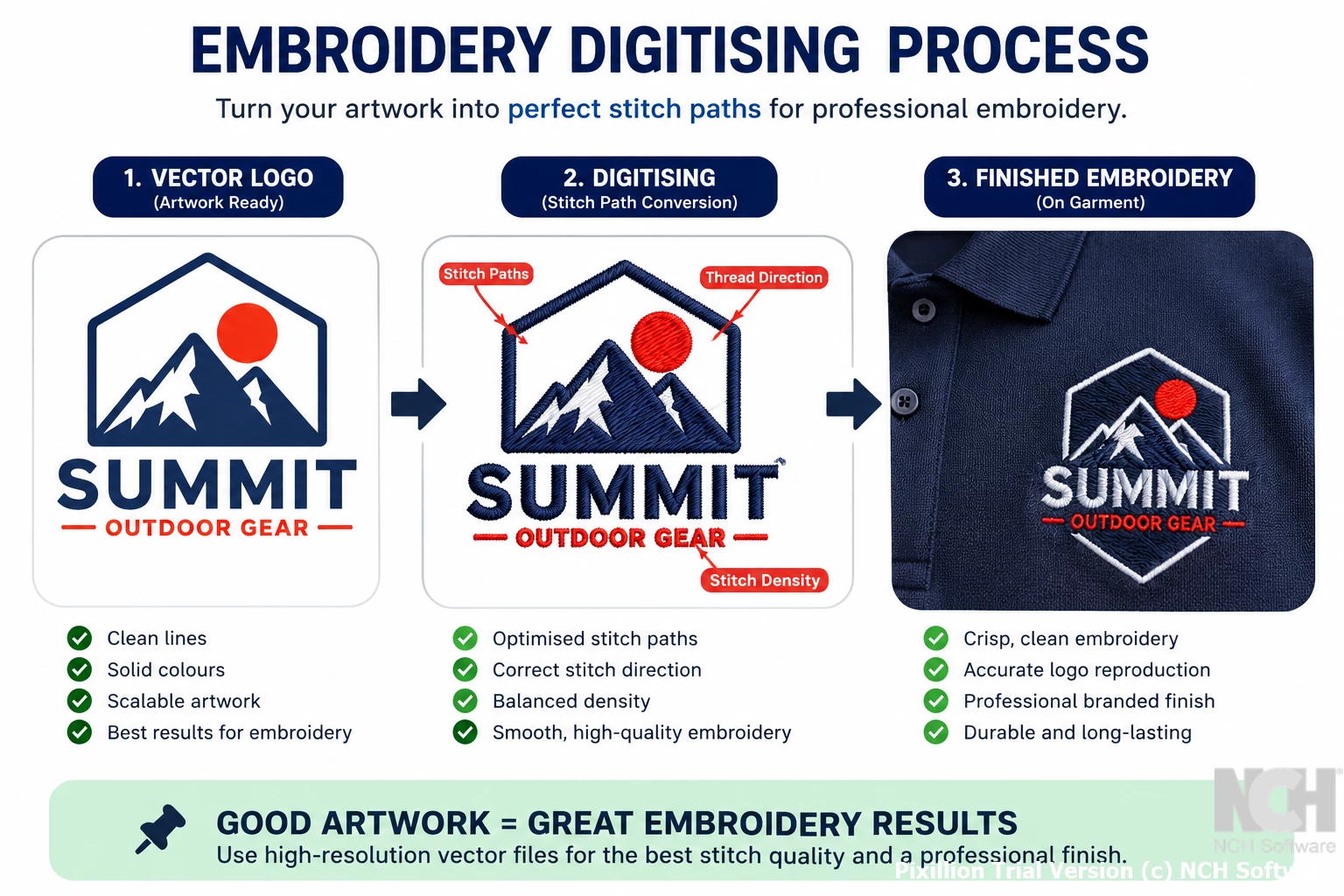
The artwork first needs to be digitised into embroidery instructions.
Digitising determines information such as:
- where stitches begin and end
- stitch direction
- stitch density
- underlay
- thread changes
- how different elements overlap
Embroidery machines commonly work with production embroidery formats such as DST and other machine-specific files.
A JPG or PNG is not an embroidery file.
Even vector artwork normally needs to be professionally digitised before embroidery.
Why simple logos work better for embroidery
Thread has physical thickness.
As a result, embroidery cannot reproduce infinitely small details in the same way that artwork appears on a computer screen.
Potential problems include:
- very small lettering
- extremely thin lines
- complex gradients
- photographic details
- tiny gaps between objects
- very detailed illustrations at a small embroidery size
In some cases, a logo may need to be simplified slightly for embroidery while keeping the overall branding as close as possible to the original.
This is normal embroidery artwork preparation and is not a defect in the original logo.
Which Artwork Is Required for Screen Printing?
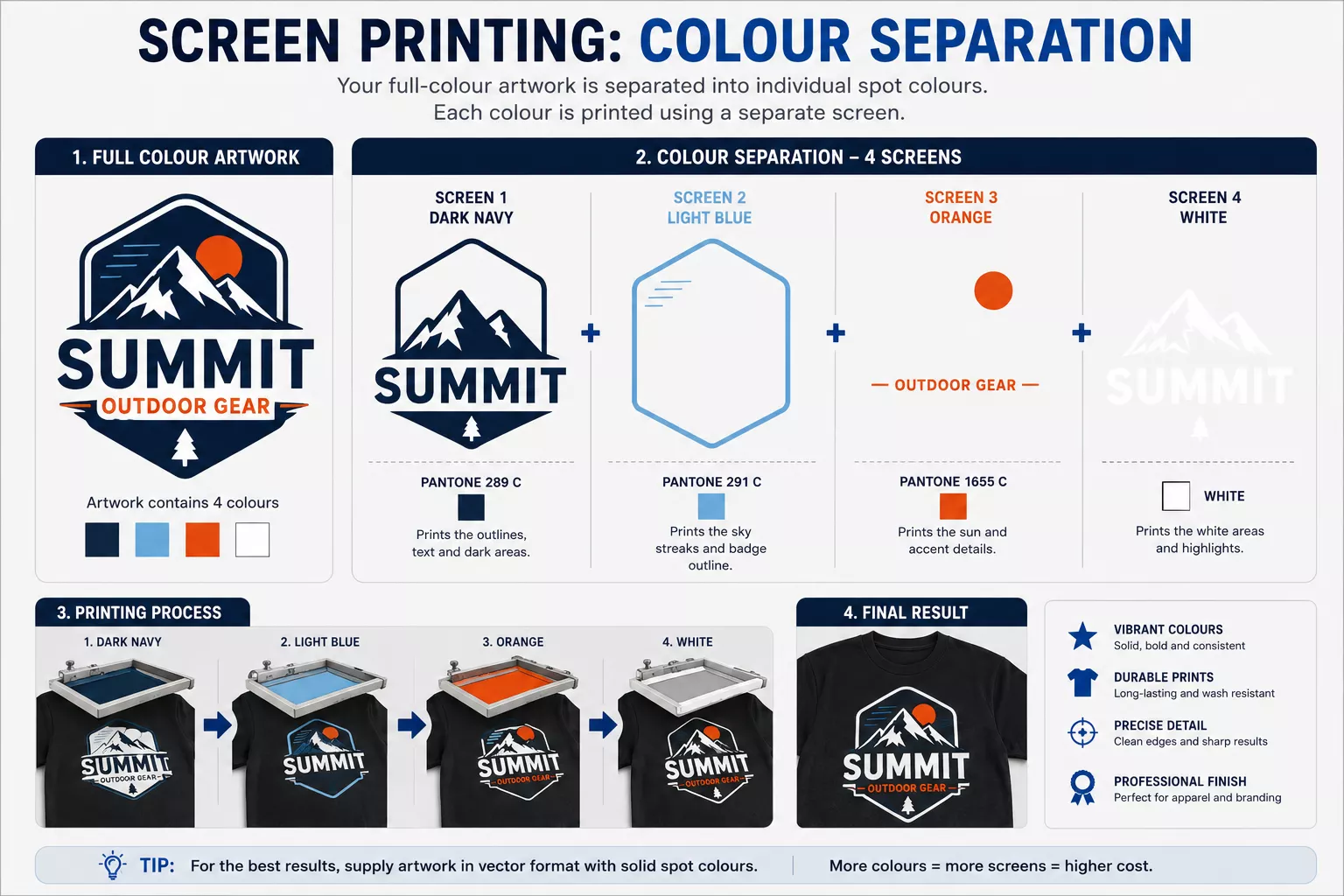
Traditional screen printing frequently requires artwork to be separated into individual printable colours.
Vector artwork is therefore highly preferable for logos and graphic designs.
Good vector artwork makes it easier to:
- separate individual colours
- produce clean edges
- adjust artwork size
- prepare screens
- identify spot colours
Complex photographic screen printing is also possible using specialised separation techniques, but the artwork requirements are different from a simple spot-colour logo.
Which Artwork Is Required for Pad Printing?
Pad printing is commonly used for products such as:
- pens
- small plastic promotional items
- gadgets
- keyrings
- small accessories
Vector artwork is normally strongly preferred because pad printing often involves one or more individual solid print colours.
Very thin lines, very small text, gradients and extremely detailed artwork may not reproduce correctly depending on the product and printing area.
Which Artwork Is Required for Laser Engraving?
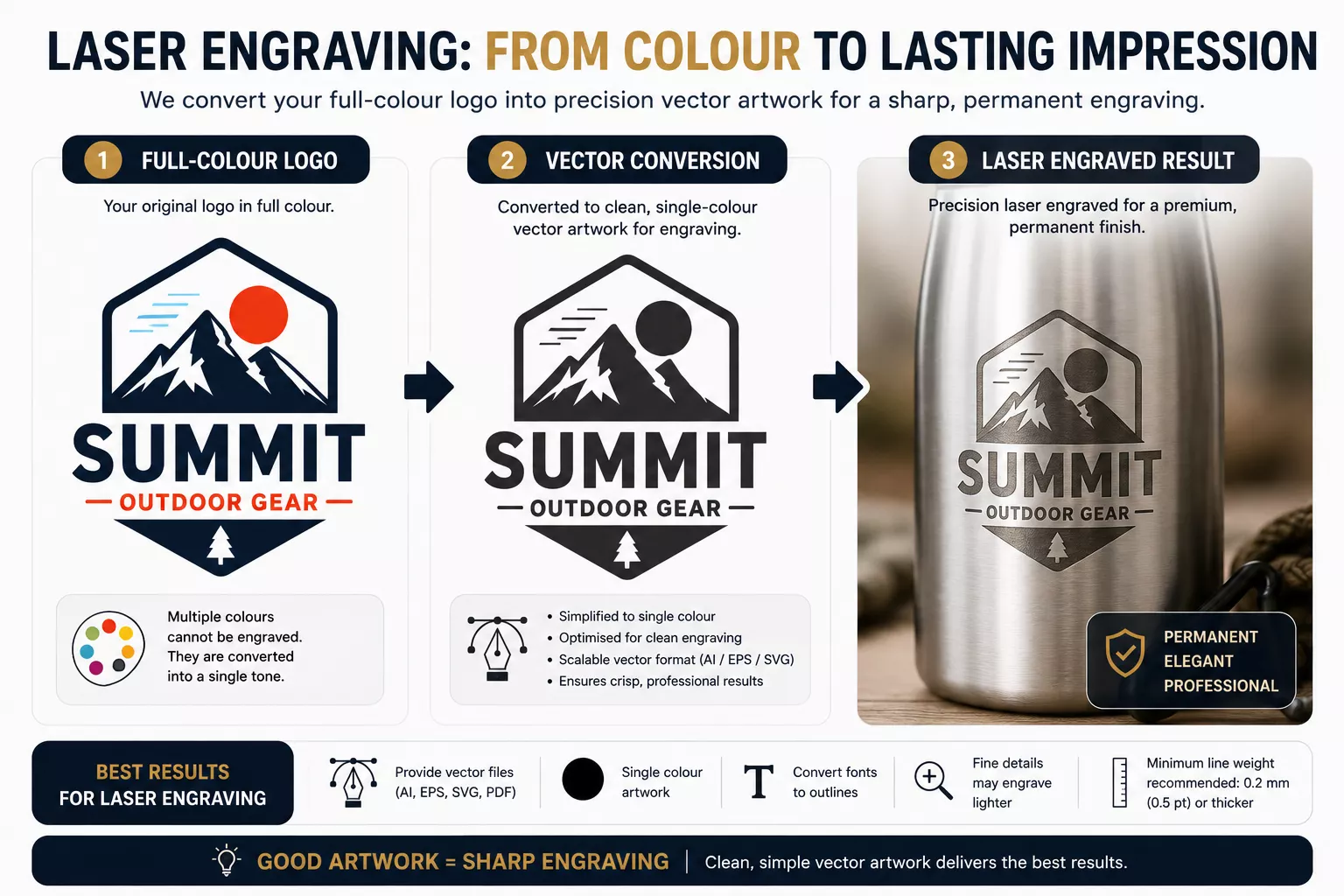
Laser engraving does not normally reproduce your logo using printed ink colours.
Instead, a laser changes or removes the surface of the product.
The final colour depends on the material being engraved.
Vector artwork is generally preferred because the laser system needs clean paths and clearly defined shapes.
Complicated gradients, shadows and photographic effects may need to be simplified or converted depending on the product and engraving technology.
Which Artwork Is Required for UV Printing?
UV printing can reproduce full-colour artwork directly onto many different products and materials.
High-resolution raster artwork may therefore be acceptable for photographic designs, while vector artwork remains preferable for logos, text and graphic elements.
Artwork requirements can also change where:
- white ink is required
- clear varnish is required
- specific layers need to be created
- the product has an unusual shape
Which Artwork Is Required for Sublimation?
Sublimation is another process where high-resolution raster artwork can work extremely well.
It is commonly used for full-colour designs and photographic artwork.
As with DTF, however, the image still needs sufficient resolution for the intended print size.
Vector artwork is still preferable for logos, text and graphic elements because it gives us the cleanest possible starting point.
What About Large-Format Printing, Banners and Signs?
Artwork requirements for large-format printing depend heavily on the finished size and viewing distance.
A banner viewed from several metres away does not necessarily require the same pixels-per-inch value as a small brochure viewed from 30 cm away.
Nevertheless, starting with good-quality artwork remains extremely important.
Logos should preferably be supplied as vector artwork, particularly when they may need to be enlarged dramatically.
Photographs should be supplied at the highest original resolution available.
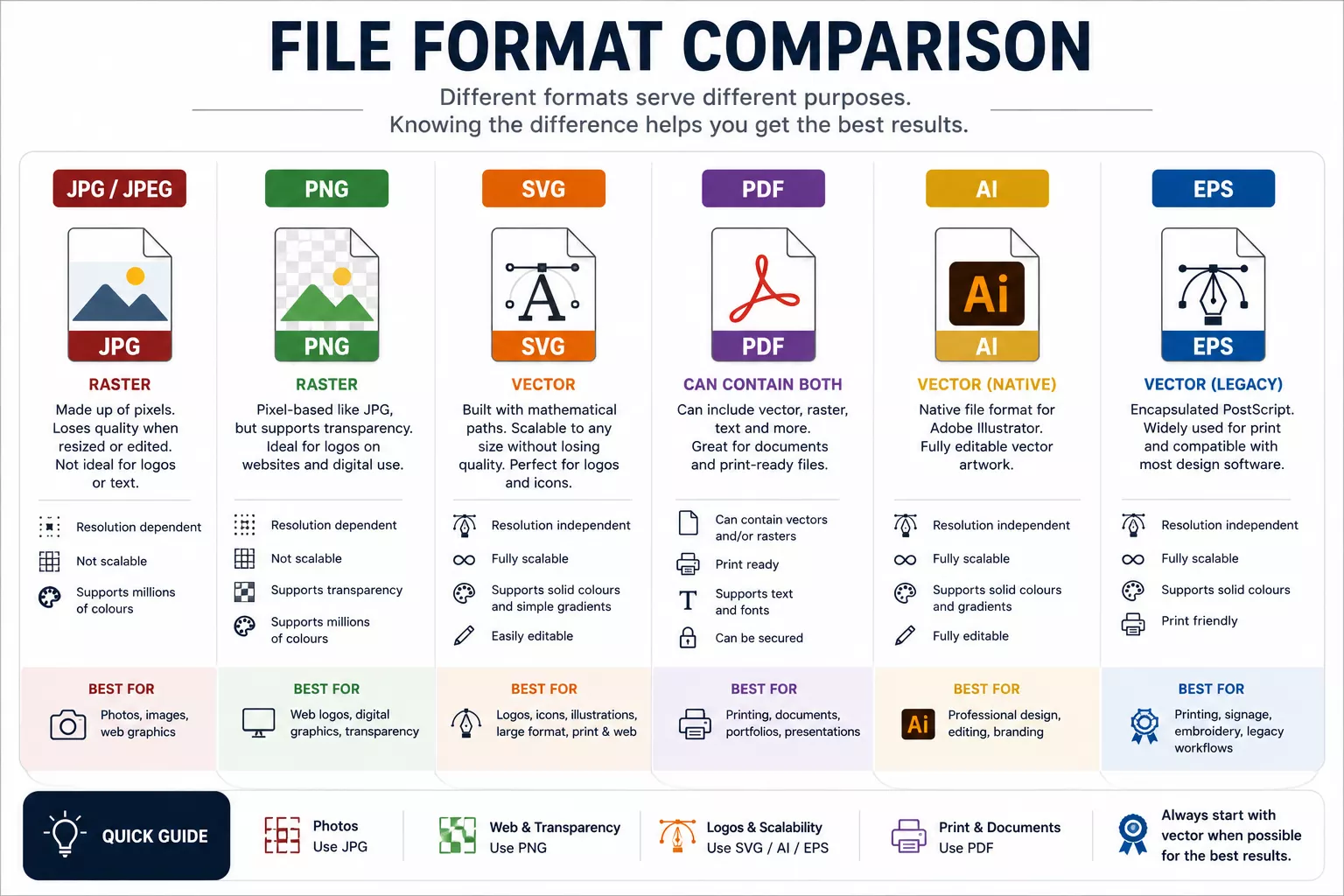
JPG vs PNG vs SVG vs PDF vs AI vs EPS
| Format | Usually Vector? | Transparency? | Typical Use |
|---|---|---|---|
| JPG / JPEG | No | No | Photographs and raster images |
| PNG | No | Yes | Transparent raster graphics, DTF and digital applications |
| SVG | Usually | Yes | Vector logos and graphics |
| AI | Usually | Yes | Professional editable vector artwork |
| EPS | Usually | Yes | Professional print/vector artwork |
| Maybe | Possible | Can contain vector, raster or both |
The words “usually” and “maybe” are important.
It is possible to place a poor-quality JPG inside an AI, EPS, SVG or PDF file. The extension alone therefore cannot guarantee that the contents are truly vector.
What If My Artwork Was Made in Canva?
Canva is widely used to create marketing materials and can often produce usable files, but the correct export option is important.
Sending us a screenshot of your Canva design is not recommended.
Depending on your design, printing method and Canva account features, suitable exports may include:
- PDF Print
- SVG for suitable graphic artwork where available
- high-resolution PNG
- transparent PNG where appropriate and available
If the design contains a logo that originally came from a small JPG, however, exporting the Canva page as a larger PDF does not necessarily restore the missing logo quality.
The quality of the elements placed inside the design matters too.
If possible, also send us the original logo separately.
What If My Artwork Is in Microsoft Word or PowerPoint?
Word and PowerPoint files are not normally ideal master artwork formats for professional printing.
They can contain useful information and may sometimes contain usable graphics, but they can also cause problems with:
- font substitution
- positioning
- image compression
- colour changes
- missing linked graphics
If your design was prepared in Word or PowerPoint because no original artwork is available, please send us the original document rather than only sending a screenshot of it.
Also send the original logo file separately wherever possible.
Fonts and Text in Artwork
Fonts are another common source of artwork problems.
If editable vector artwork uses a font that we do not have installed, the appearance of the text can change when the artwork is opened.
For final production artwork, text should ideally be converted to outlines or curves.
This converts each letter into vector shapes and removes the dependency on the original font file.
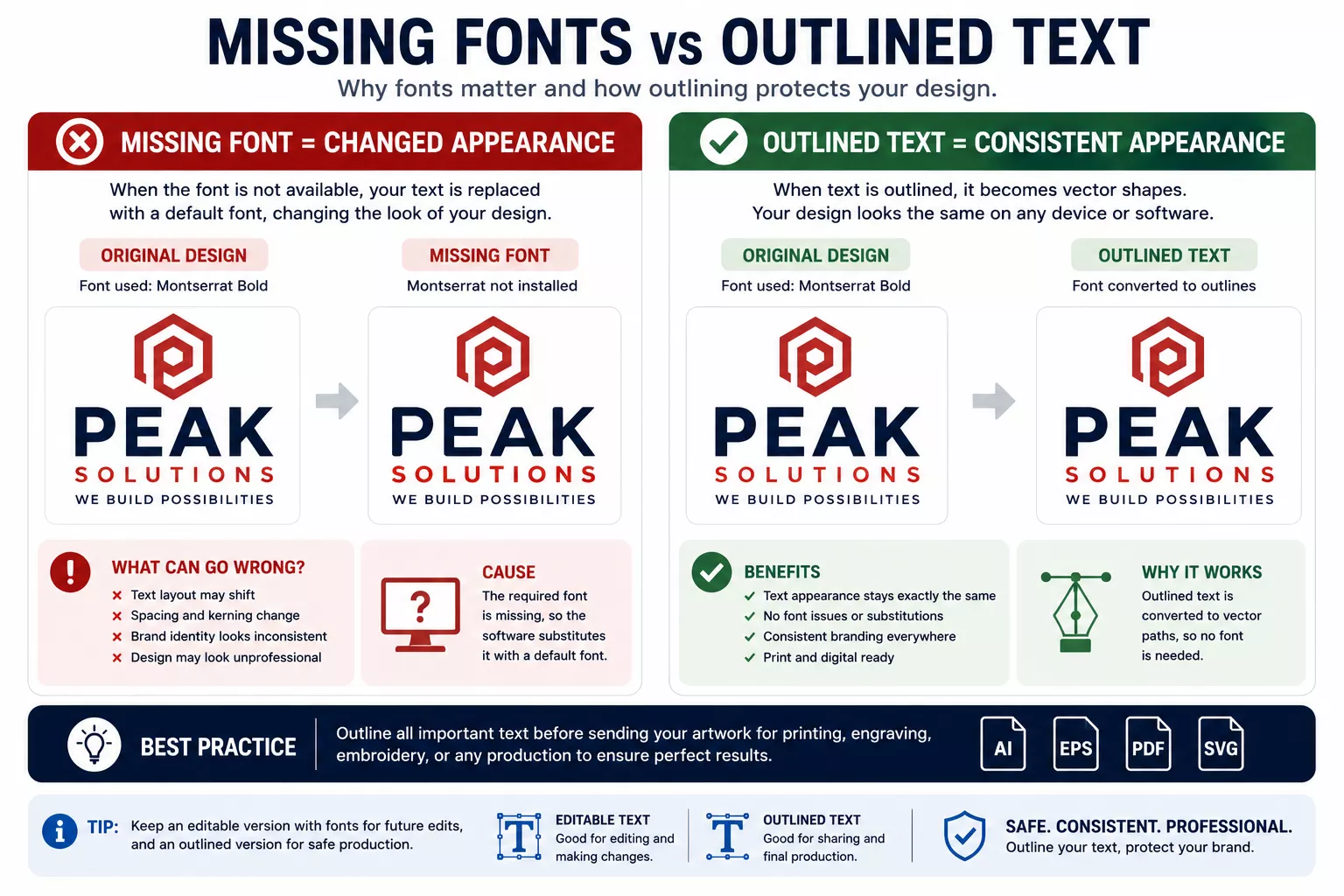
Please note that once text is converted to outlines, it is no longer normal editable text. Therefore, keeping a separate editable master file is good practice.
Very Small Text Can Still Be a Problem
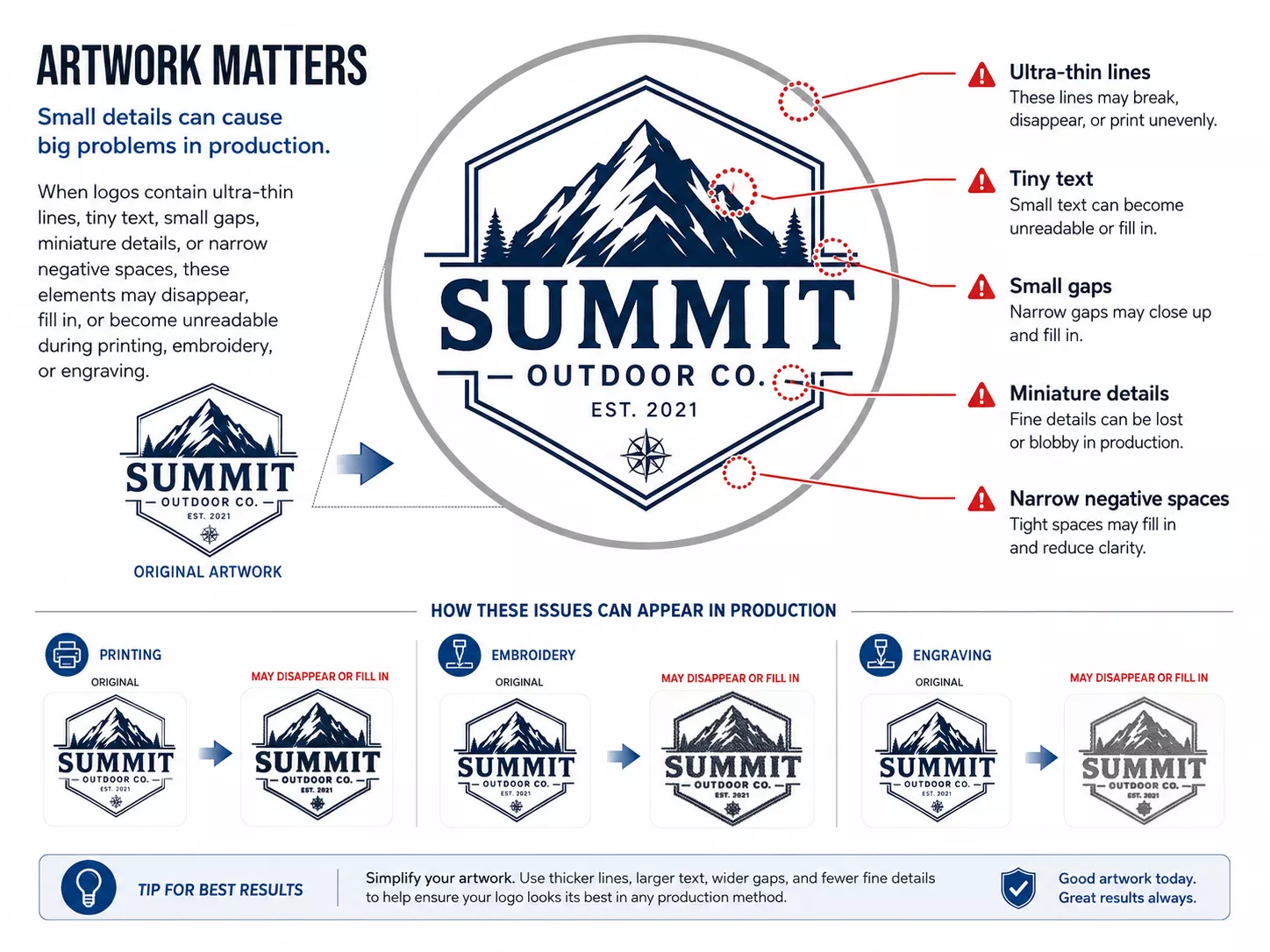
Even perfectly vectorised text cannot always be printed at any size.
Every printing method has physical production limitations.
For example, extremely small lettering may:
- fill in during printing
- lose fine details
- become unreadable
- be unsuitable for embroidery
- be unsuitable for engraving
If necessary, we may recommend increasing the artwork size, increasing line thickness or simplifying certain elements.
Thin Lines and Tiny Details
The fact that something exists in the artwork does not guarantee that a machine can reproduce it physically.
This applies particularly to:
- hairline strokes
- tiny gaps
- small negative spaces
- very fine outlines
- small trademark text
- tiny decorative details
The minimum reproducible detail depends on the decoration method, product material, print size and production equipment.
Gradients, Shadows and Transparency Effects
Modern digital printing processes can reproduce many gradients, shadows and transparency effects extremely well.
Other processes cannot.
A full-colour DTF print, for example, may reproduce a smooth colour gradient that would require a completely different artwork preparation method for traditional spot-colour screen printing.
Likewise, a full-colour logo may need to be converted into a simpler single-colour version for:
- laser engraving
- certain pad-printing applications
- certain screen-printing applications
- debossing
- embossing
For this reason, professional brands should ideally maintain several official versions of their logo.
Ideally Your Company Should Have These Logo Versions
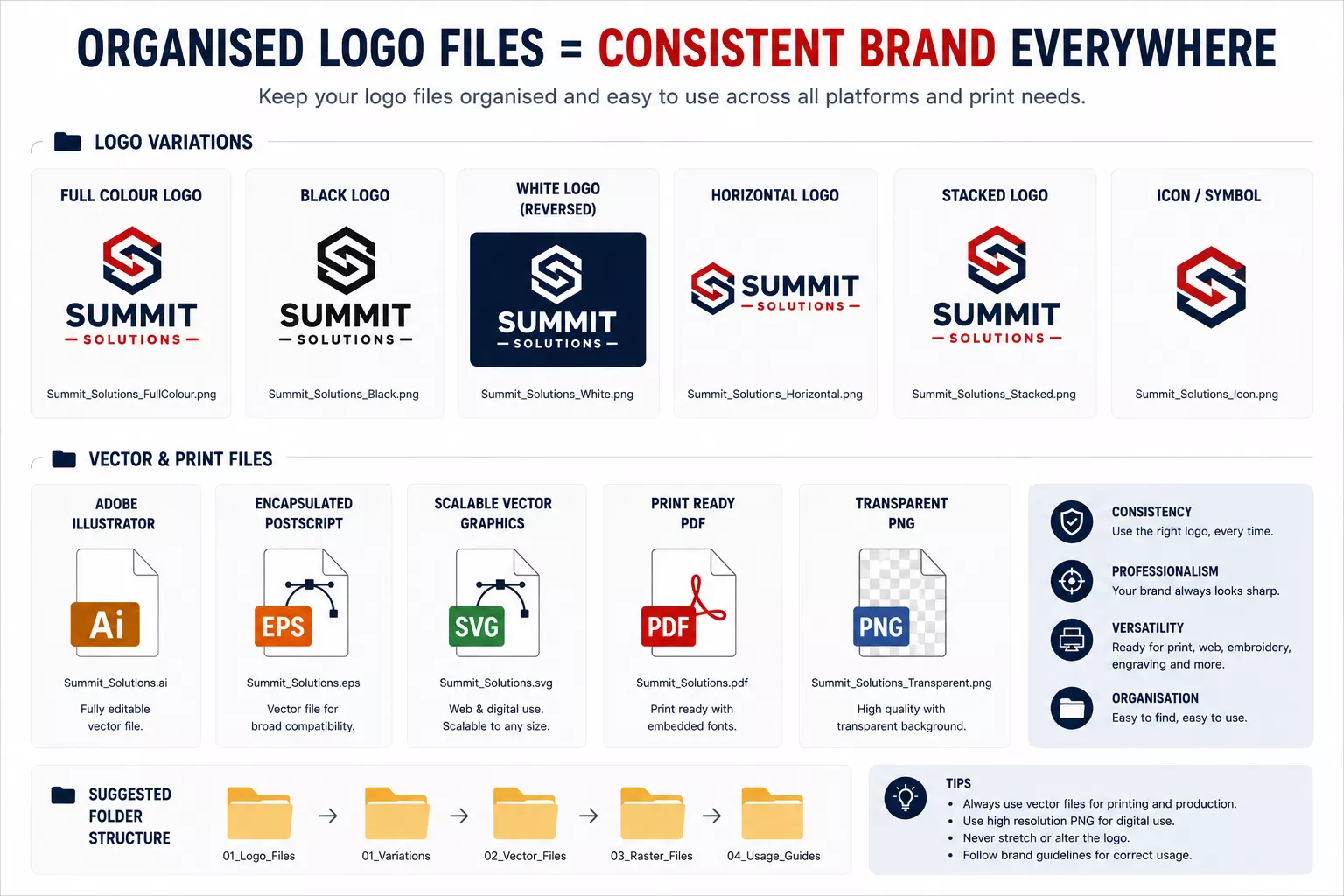
We recommend keeping a small organised artwork folder containing:
- full-colour logo
- single-colour black logo
- single-colour white/reversed logo
- horizontal logo
- vertical or stacked logo where applicable
- vector AI/EPS/SVG version
- vector PDF version
- high-resolution transparent PNG version
- official brand colour references
This makes ordering future merchandise considerably easier.
RGB, CMYK and Pantone Colours
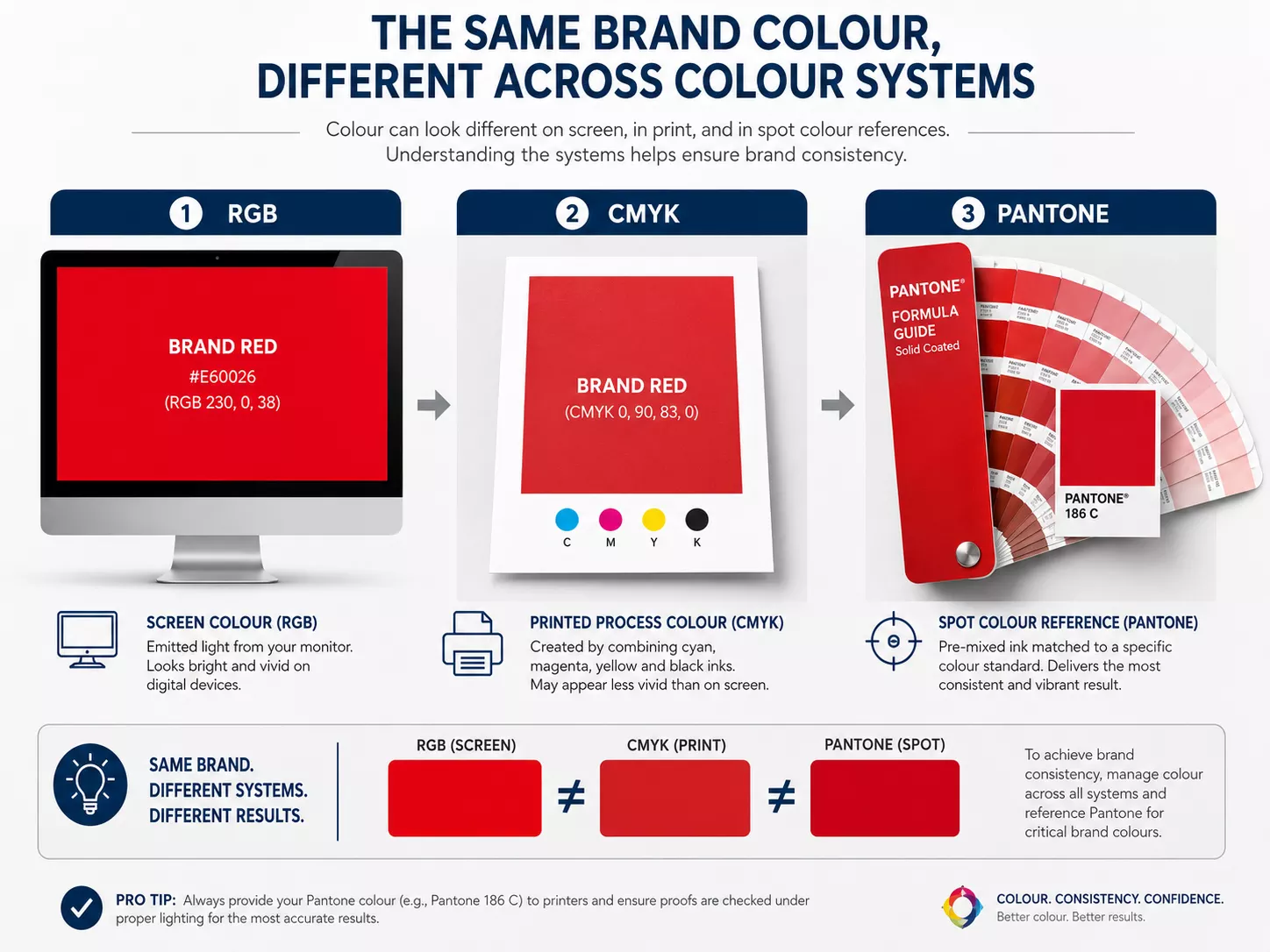
Colour is another important consideration when supplying artwork.
RGB
RGB stands for Red, Green and Blue.
It is primarily used by screens such as phones, monitors and websites.
CMYK
CMYK stands for Cyan, Magenta, Yellow and Black.
It is widely used in full-colour printing.
Pantone / spot colours
Pantone references and other spot-colour systems are used where a specific standardised colour reference is required.
If your organisation has official brand guidelines, please provide them.
Useful information includes:
- Pantone colour references
- CMYK values
- RGB values
- HEX values
Please note that a colour displayed on your phone or computer monitor is not a reliable physical colour reference.
Different screens display colours differently, and different products and printing processes can also affect the appearance of the finished colour.
Why Can My Brand Colour Look Different on Different Products?
The same logo colour may look slightly different when printed on:
- cotton
- polyester
- metal
- wood
- plastic
- glass
- ceramic
- recycled materials
The printing process also makes a difference.
For example, the same brand colour produced using screen-printing ink, sublimation ink, DTF ink and embroidery thread will not necessarily appear absolutely identical.
Where colour matching is critical, please tell us when requesting your quotation so that we can advise what is possible for the selected product and decoration method.
Photographs Are Different From Logos
Photographs are naturally raster images.
You do not normally need to convert a photograph into vector artwork.
Instead, send us the original, highest-resolution version of the photograph.
Avoid:
- screenshots of photographs
- photos downloaded from social media
- images repeatedly saved and re-compressed
- small thumbnail versions
If the original photograph from the camera or phone is available, send that version.
QR Codes and Barcodes Require Special Attention
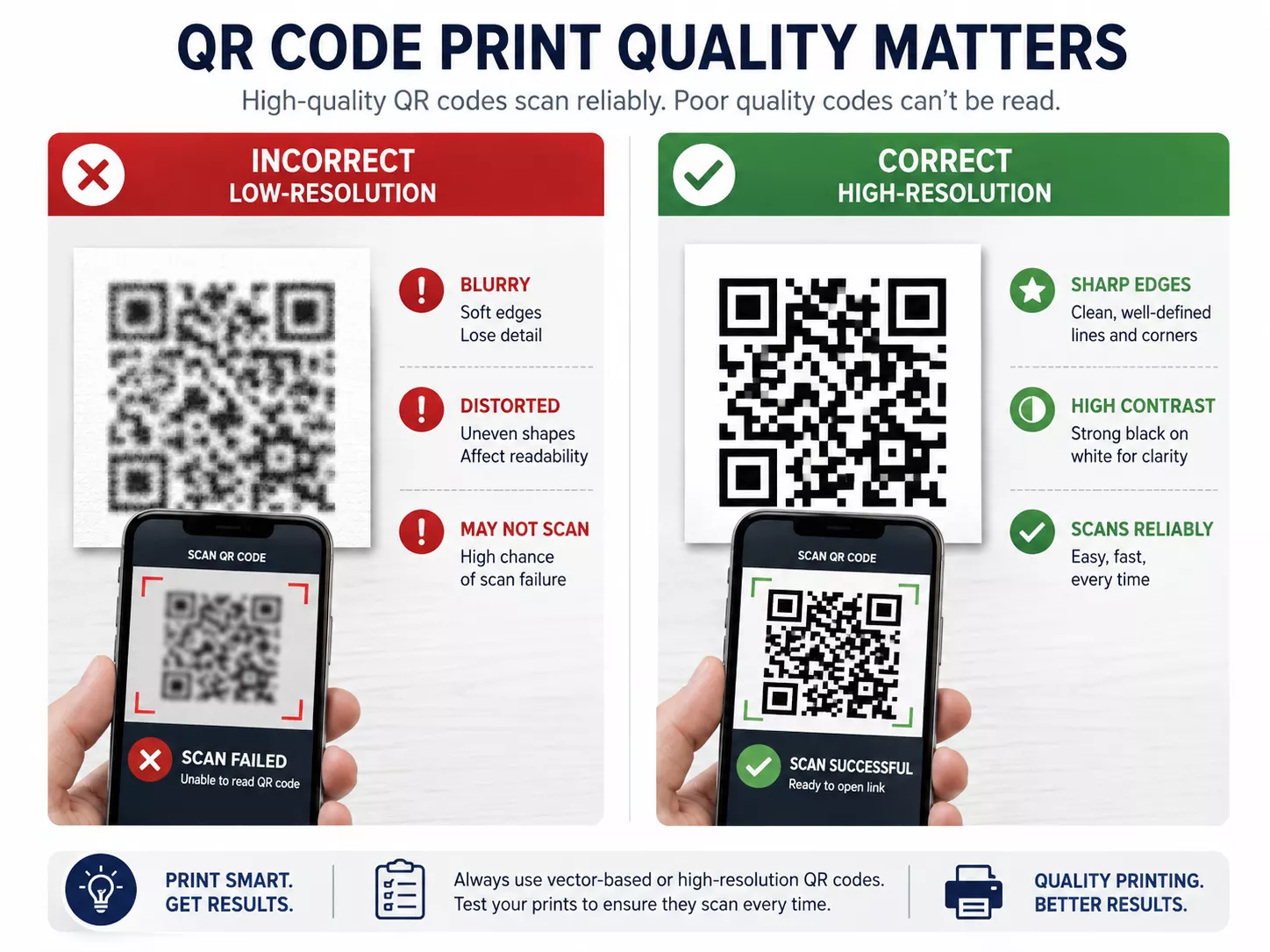
If your design contains a QR code or barcode, image quality becomes particularly important.
The code needs sufficiently clean edges, suitable contrast and enough physical size to scan reliably.
Do not send a tiny screenshot of a QR code if the original file is available.
Where possible, provide the original QR code as:
- SVG
- vector PDF
- EPS
- high-resolution PNG
We also recommend testing important QR codes before approving final artwork.
Please Do Not Crop Important Parts of Your Logo
Sometimes we receive artwork where the logo itself has been cropped very tightly or part of the artwork is missing.
Please send the complete original logo wherever possible.
We can position and size the artwork during preparation, but we cannot reliably reconstruct parts of a logo that are missing from the supplied file.
Do Not Flatten Important Artwork Unless Necessary
If your designer has the original editable artwork, please retain that file.
A flattened JPG or PNG removes much of the useful editing information contained in the original design.
Where possible, send the editable vector artwork in addition to any preview JPG or PNG.
Can You Remove the Background From My Logo?
Sometimes.
If the source image is large, clean and high quality, removing a simple background may be straightforward.
However, background removal does not improve the underlying resolution of the logo.
If the original logo is blurry, the logo may still remain blurry after the background has been removed.
Complex images can also produce rough edges or halos when extracted from a background.
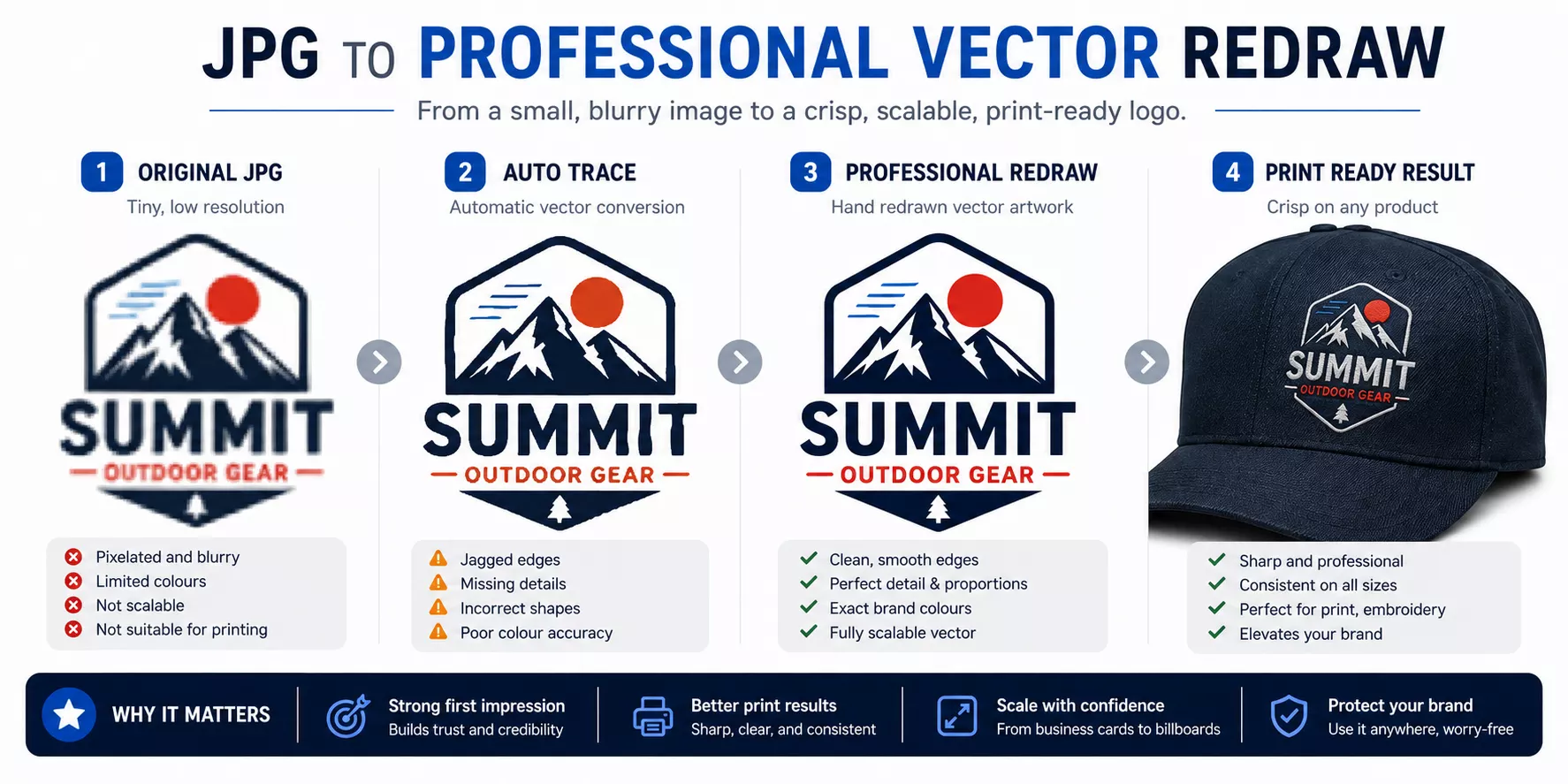
Can You Convert My JPG Into Vector Artwork?
It depends on the artwork.
Simple artwork can often be manually recreated or professionally traced.
Examples include:
- simple text logos
- basic geometric logos
- simple icons
- logos containing only a few solid colours
Complex artwork can require considerably more work.
Examples include:
- highly detailed illustrations
- poorly photographed logos
- extremely pixelated artwork
- logos containing unreadable text
- complex gradients
- artwork where original details have already been lost
Automatic “image trace” functions do not necessarily reproduce a logo accurately.
A professional redraw may therefore be required.
Why Artwork Recreation May Carry a Charge
Preparing supplied print-ready artwork for production is different from recreating a missing logo.
If suitable artwork has not been provided and a logo needs to be manually redrawn, cleaned or rebuilt, artwork charges may apply depending on the amount of work required.
Where possible, we will always recommend first checking whether the original artwork already exists.
It may be held by:
- your graphic designer
- your marketing agency
- your website designer
- your previous printer
- your sign company
- your marketing department
- your head office
- the person who originally created your branding
“My Previous Printer Used This JPG, So Why Can’t You?”
Different printing processes, machines, product sizes and production workflows have different requirements.
A small JPG that worked for printing a 20 mm logo on a pen may not be suitable for printing the same logo 280 mm wide on the back of a T-shirt.
Likewise, artwork that worked for one digital process may not be suitable for engraving, embroidery or spot-colour printing.
The question is therefore not simply whether a file has been printed before.
The question is whether it contains the information required for the specific product, print size and decoration method being used now.
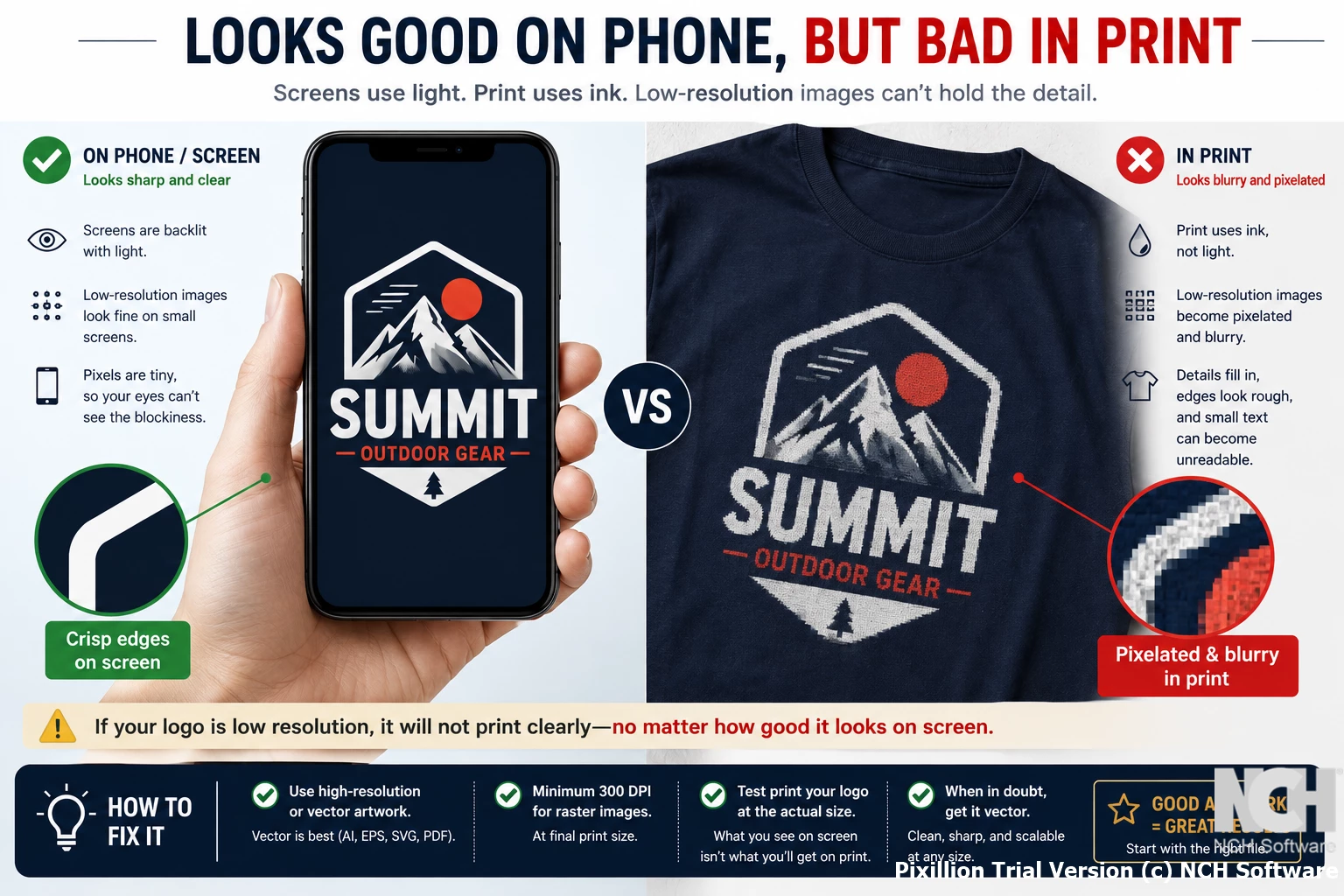
“But It Looks Perfect on My Phone”
Phones have relatively small, high-resolution screens.
An image only needs a limited number of pixels to look sharp when displayed a few centimetres wide.
Printing that same image at 20 or 30 cm wide is completely different.
This is why we may tell you that an image is low resolution even though it appears perfectly sharp when viewed normally on your phone.
“Can I Just Send the Logo From My Email Signature?”
Usually this is not recommended.
Email signatures are intentionally designed to use small files.
The logo may only be a few hundred pixels wide and may have been compressed several times.
Please locate the original company logo instead.
“Can I Send You a Photo of My Existing Uniform?”
A photograph of an existing embroidered or printed logo can be useful as a reference.
It is generally not ideal as the actual artwork from which a new logo should be produced.
Photographs introduce:
- perspective distortion
- lighting
- fabric texture
- shadows
- colour inaccuracies
Please send the photograph together with the original logo artwork if available.
What If I Have No Artwork at All?
Do not worry.
Send us the best material you have and explain the situation.
This might include:
- your website
- a previous printed item
- a business card
- a letterhead
- an old PDF
- a photograph
- a low-resolution logo
We can then advise whether the artwork can be used, extracted, improved or recreated.
Additional artwork or design charges may apply where substantial recreation is required.
What Should I Ask My Graphic Designer For?
You can send your designer this exact request:
Please send me the original vector version of our logo, preferably AI, EPS, SVG or vector PDF, together with a high-resolution transparent PNG. Please also send the official Pantone/CMYK colour references if available, and make sure fonts in the production artwork are converted to outlines.
In many cases, this will immediately provide us with everything required.
What Should I Send If I Am Not Sure?
Send us the original files rather than trying to convert them yourself.
For example, if you have:
- logo.ai
- logo.eps
- logo.pdf
- logo.png
- logo.jpg
send all of them.
We can identify which version is most suitable.
There is generally no benefit in opening the JPG and converting it into several different file formats before sending it to us.
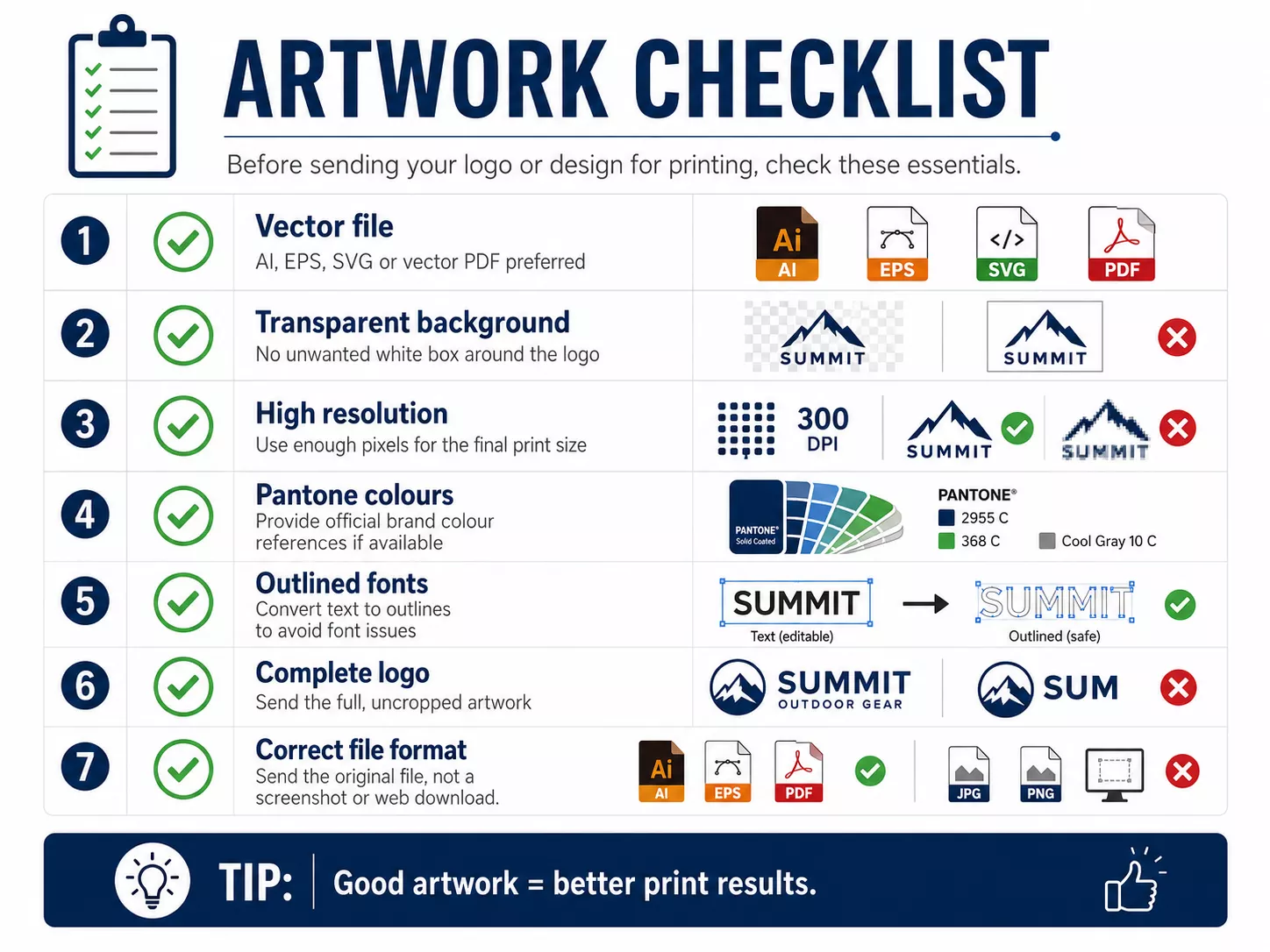
Artwork Checklist Before Sending Your Order
Before sending your artwork, check the following:
- Is this the original logo file?
- Do I have an AI, EPS, SVG or vector PDF?
- If I am sending PNG artwork, is it genuinely high resolution?
- Is the background transparent where required?
- Are there unwanted white edges around the logo?
- Is all text sharp and readable?
- Are any parts of the logo cropped?
- Have I supplied the correct version of the logo?
- Do I have official Pantone or colour references?
- Are QR codes or barcodes high quality?
- Have I avoided screenshots where an original file is available?
- Have I avoided downloading a tiny version from my website?
- Have I supplied any special brand guidelines?
Best Artwork by Decoration Method: Quick Reference
| Decoration Method | Preferred Artwork | Important Notes |
|---|---|---|
| DTF Printing | Vector or high-resolution transparent PNG | Raster artwork can work very well if resolution and transparency are sufficient. |
| Embroidery | Clean vector artwork preferred | Artwork must still be professionally digitised into embroidery stitches. |
| Screen Printing | Vector preferred | Colour separation may be required. |
| Pad Printing | Vector preferred | Fine detail and gradients may not be suitable. |
| Laser Engraving | Vector preferred | Artwork may need to be converted to a simplified single-colour version. |
| UV Printing | Vector or high-resolution raster | Full colour possible; special white/varnish layers may sometimes be required. |
| Sublimation | Vector or high-resolution raster | Excellent for full-colour and photographic artwork. |
| Large Format Printing | Vector logos and high-resolution photography | Required resolution depends on final size and viewing distance. |
The Most Important Rule: Send the Original Artwork
If there is one thing to remember from this guide, it is this:
Always send the original artwork whenever possible.
Please do not:
- take a screenshot of it
- download a tiny copy from your website
- copy it from Facebook
- photograph it from a business card
- convert a small JPG into PDF and assume it is now vector
The original file gives us the best possible starting point and helps us produce the best possible finished result.
Why We Check Artwork Before Production
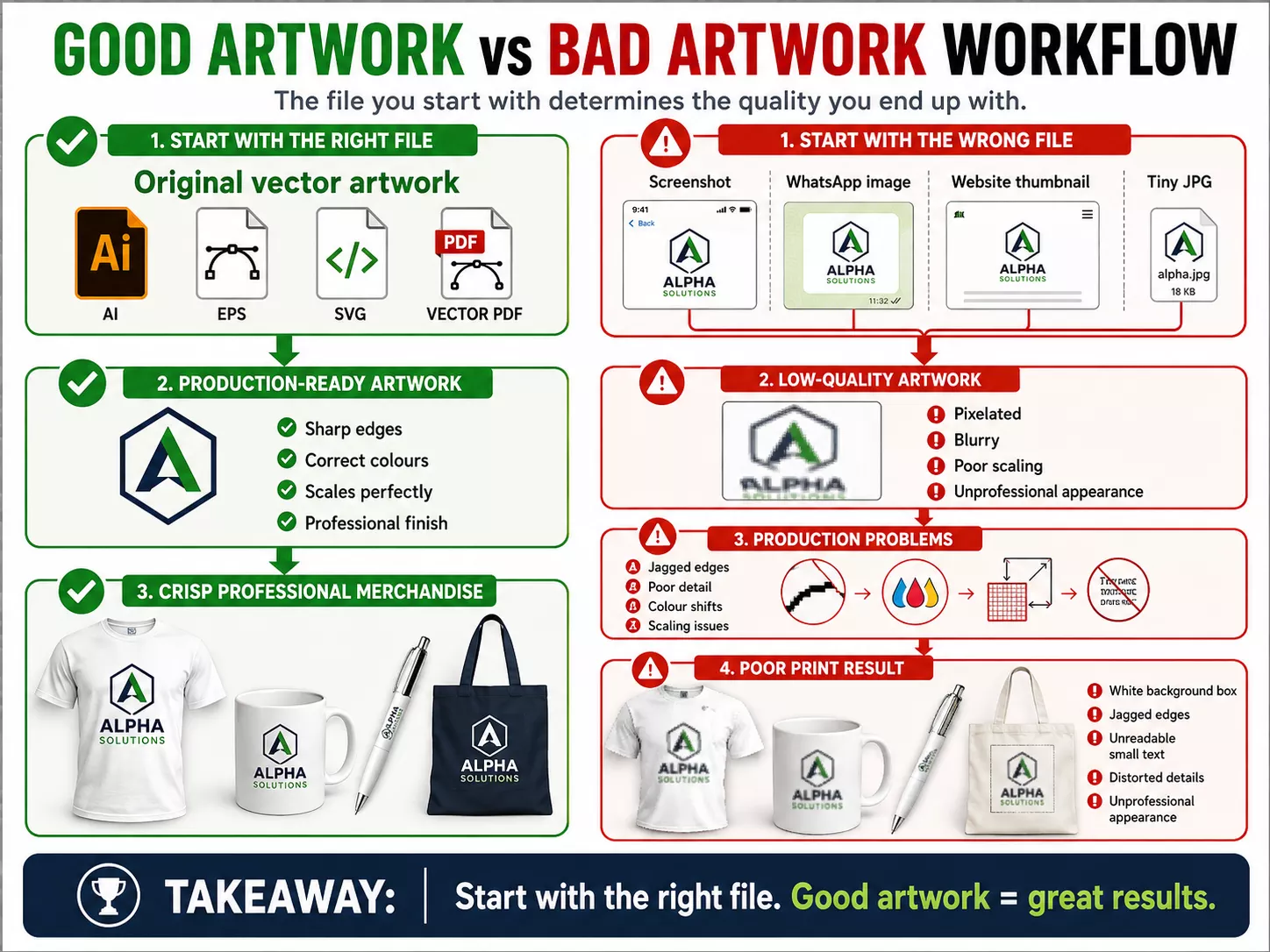
When we request better artwork, we are not trying to make the ordering process more difficult.
The opposite is true.
Artwork checking helps avoid:
- blurry logos
- pixelated printing
- incorrect backgrounds
- missing details
- unreadable text
- poor embroidery
- incorrect logo proportions
- unexpected colour problems
- production delays
Once a product has been physically printed, embroidered, engraved or otherwise customised, the artwork cannot simply be replaced like an image on a website.
It is therefore far better to identify an artwork problem before production starts.
Sending Artwork to Custom Island Gifts
If you are unsure whether your artwork is suitable, simply send us the best files you have.
Please send the original files rather than screenshots or converted copies wherever possible.
If multiple versions exist, send them all and we can determine which file is most appropriate for the product and printing process being quoted.
Our team will advise you if:
- the artwork is ready for production
- a higher-resolution version is required
- vector artwork is required
- a transparent background is required
- the artwork needs to be redrawn
- the design needs to be simplified for the selected decoration method
Good artwork is the starting point for good printing.
Providing the correct files helps us produce sharper branding, cleaner decoration and a finished product that represents your organisation professionally.